


The DFPlayer Mini offers six equalizer presets — Normal, Pop, Rock, Jazz, Classic and Bass — activated with a single command. They're built into most of my audio modules (the Ambi'Son, the Télé'Son, etc.), and yet, nowhere is it written what these settings actually do to the sound. So I was using them somewhat blindly.
I wanted to settle the matter and measure them. The result surprised me: these equalizers only act on MP3 files, and not at all on WAV. And when they do act, their curves have almost nothing to do with their names. Here's the whole story, the curves, and everything you need to redo it all yourself.
The starting question
Every module I build carries a DFPlayer Mini, and I pick an equalizer preset for it at programming time. But on what basis? The six names — Pop, Rock, Jazz… — evoke musical intentions, yet no datasheet specifies which frequencies are affected, nor by how much. Worse: I found some of my outputs too harsh in the highs, without knowing whether a preset could fix it.
After searching online, I found no published measurement of these equalizer curves, nor the slightest comparison between the module's two audio outputs (the "DAC" line output and the amplified "3W" output). So I decided to do it, properly, on the bench.
The discovery, in brief
Three lessons stand out from the measurements, and the first is the most unexpected.
1. The equalizer acts ONLY on MP3. On a WAV file, the six presets give a rigorously identical spectrum: the equalizer does nothing. On MP3, however, each preset clearly reshapes the sound. The DFPlayer's equalizer therefore lives in the MP3 decoding path, and the PCM of a WAV escapes it entirely.
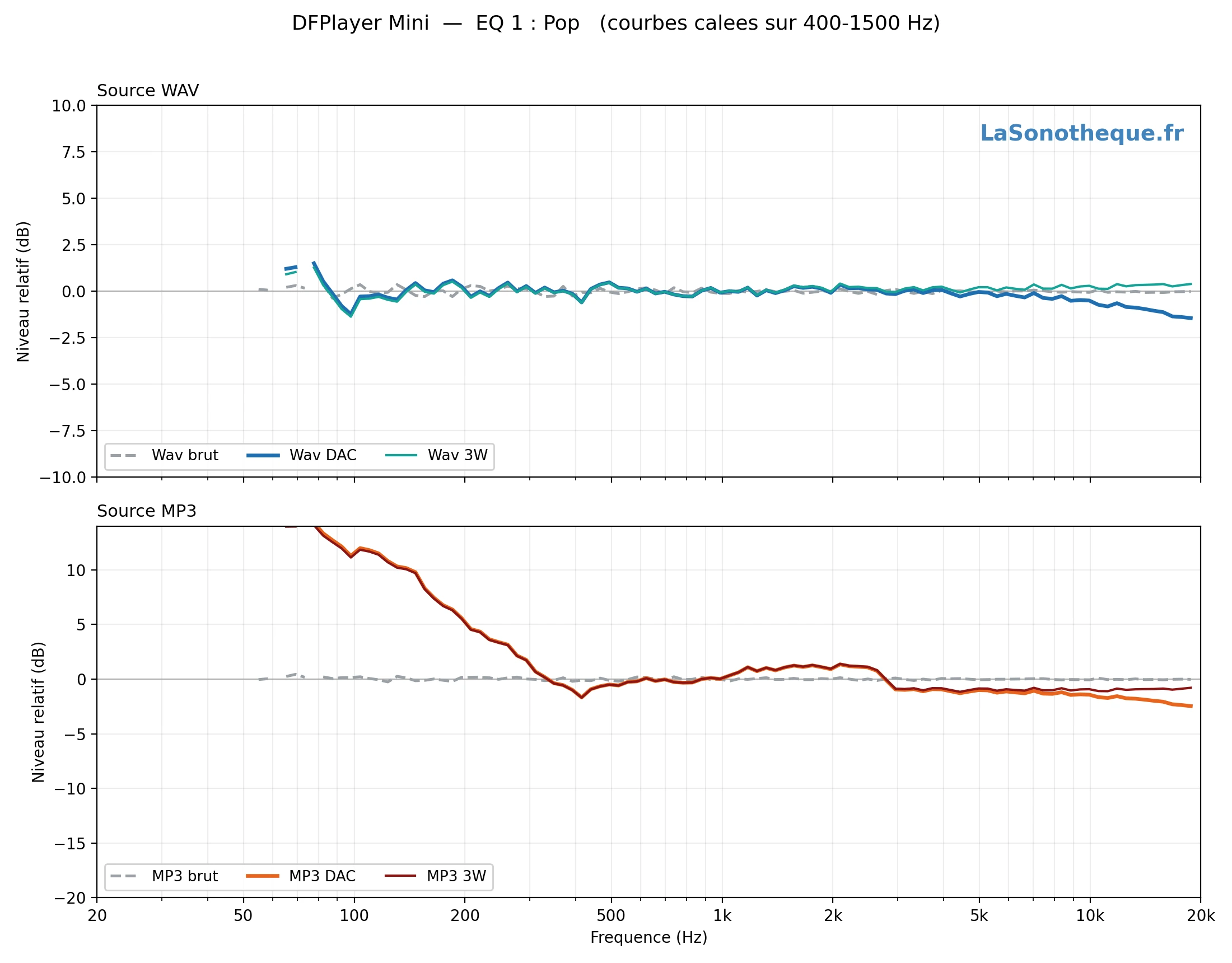
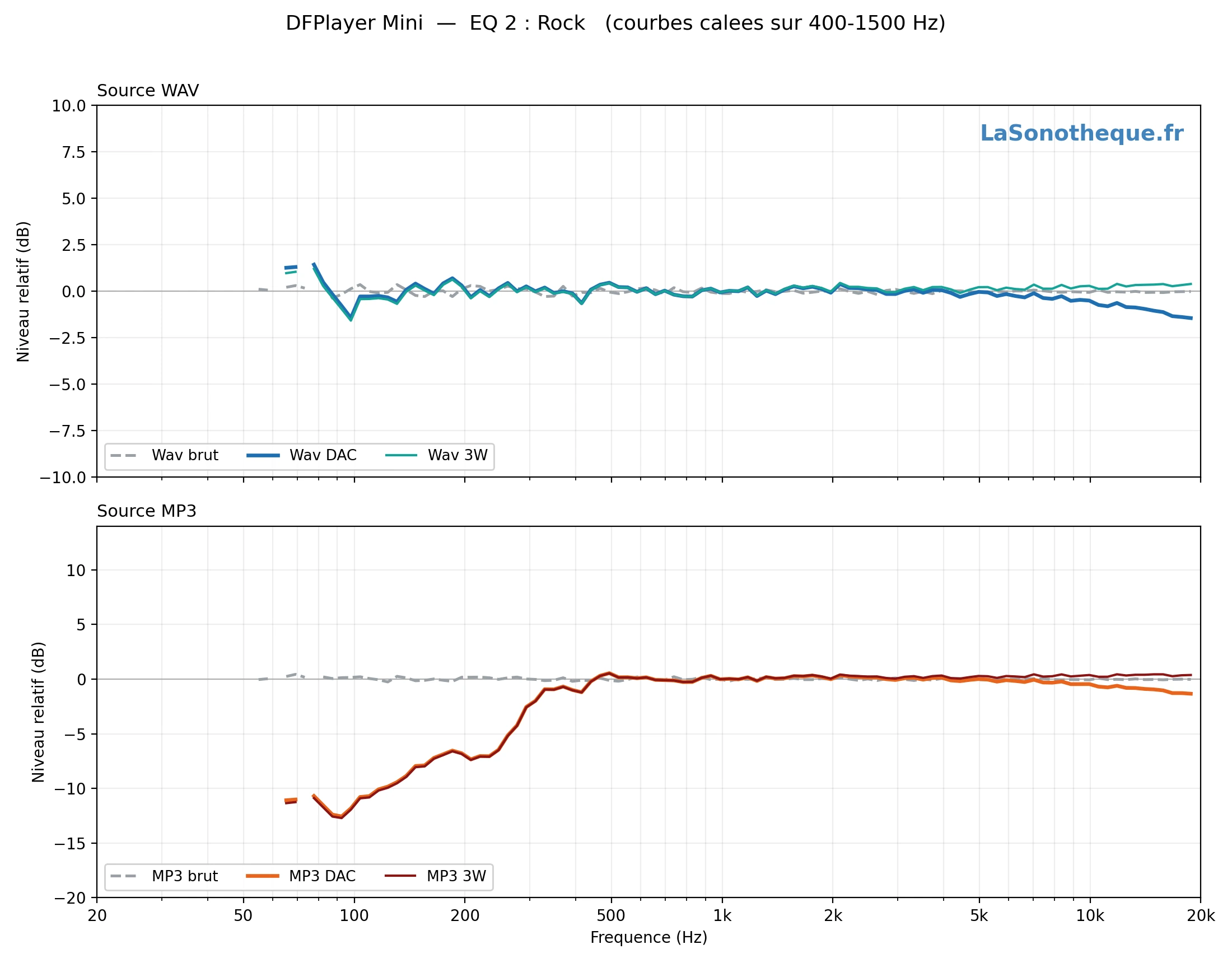
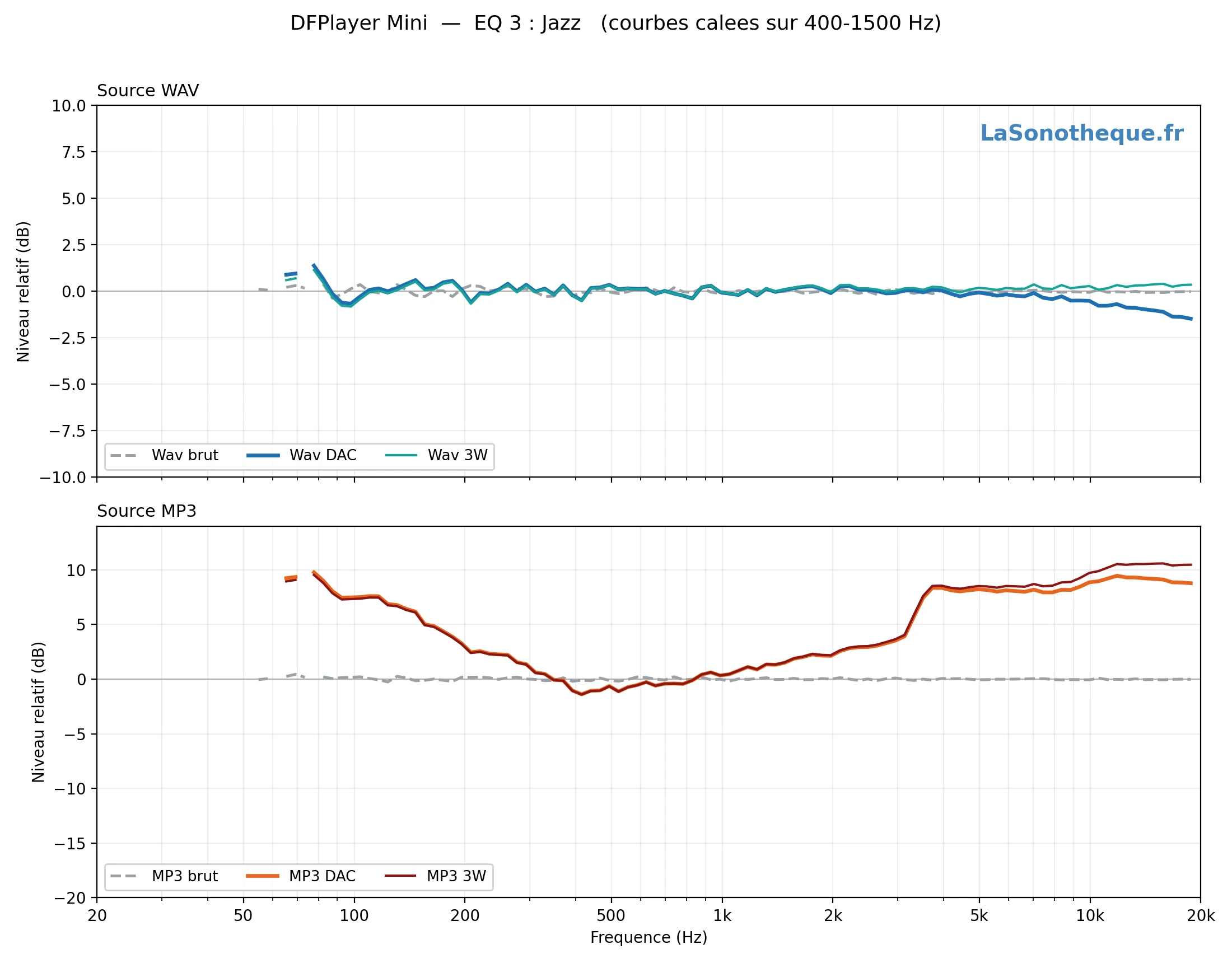
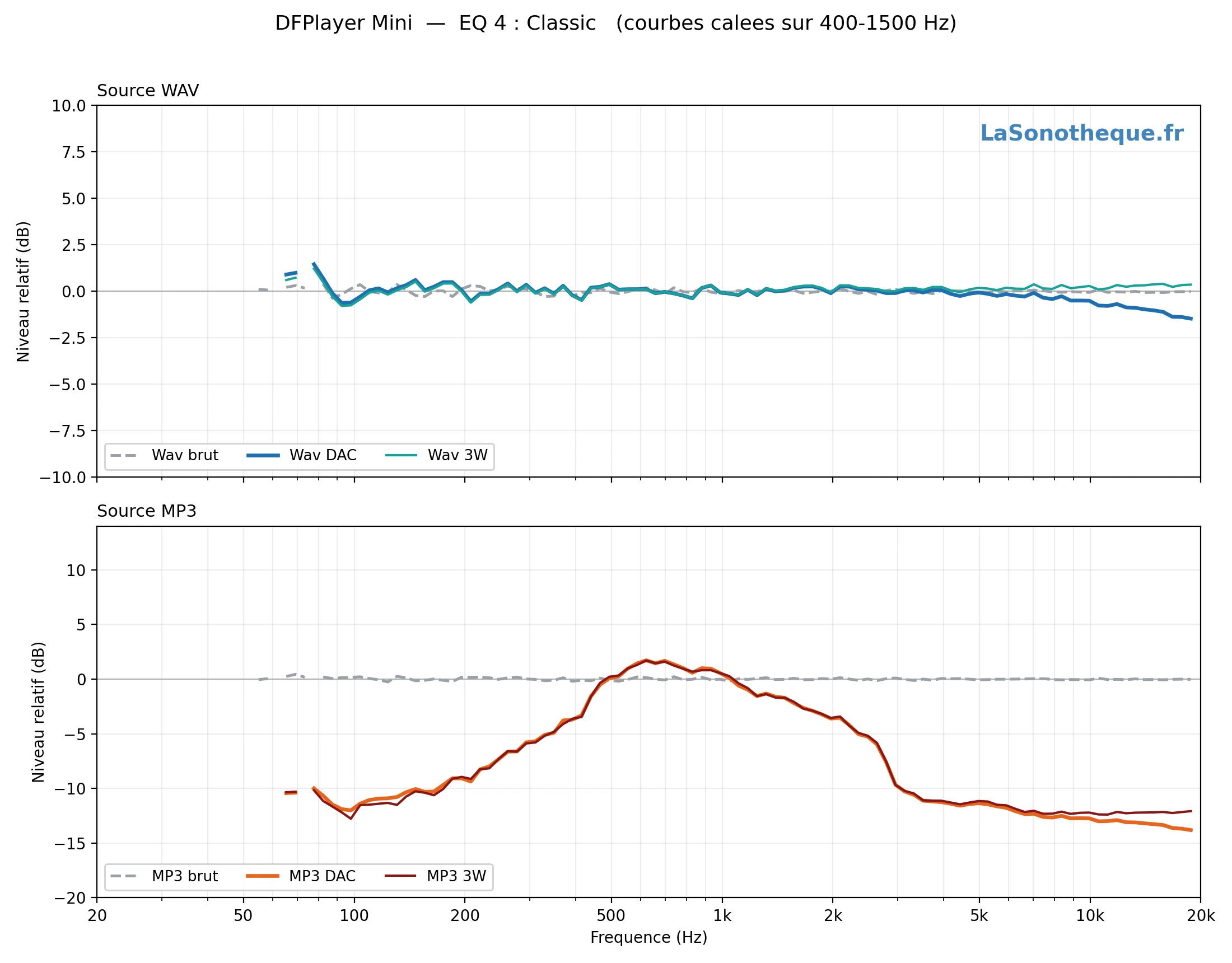
2. The names don't match the curves. It's "Pop" that pushes the bass the most (+13 dB), while "Bass"… does nothing at all (identical to Normal). "Jazz" is a smile curve (bass and treble lifted), "Classic" scoops out both extremes to keep only the midrange, and "Rock" cuts the bass. Anyone choosing a preset by trusting its name picks the wrong curve.
3. The DAC and 3W outputs have the same response. The amplified 3W output faithfully follows the DAC line output: the internal amp adds no notable coloration. Both paths therefore carry the same equalizer, and differ only in what you connect at the end of the chain (headphones or a line-level amp, a loudspeaker on 3W).
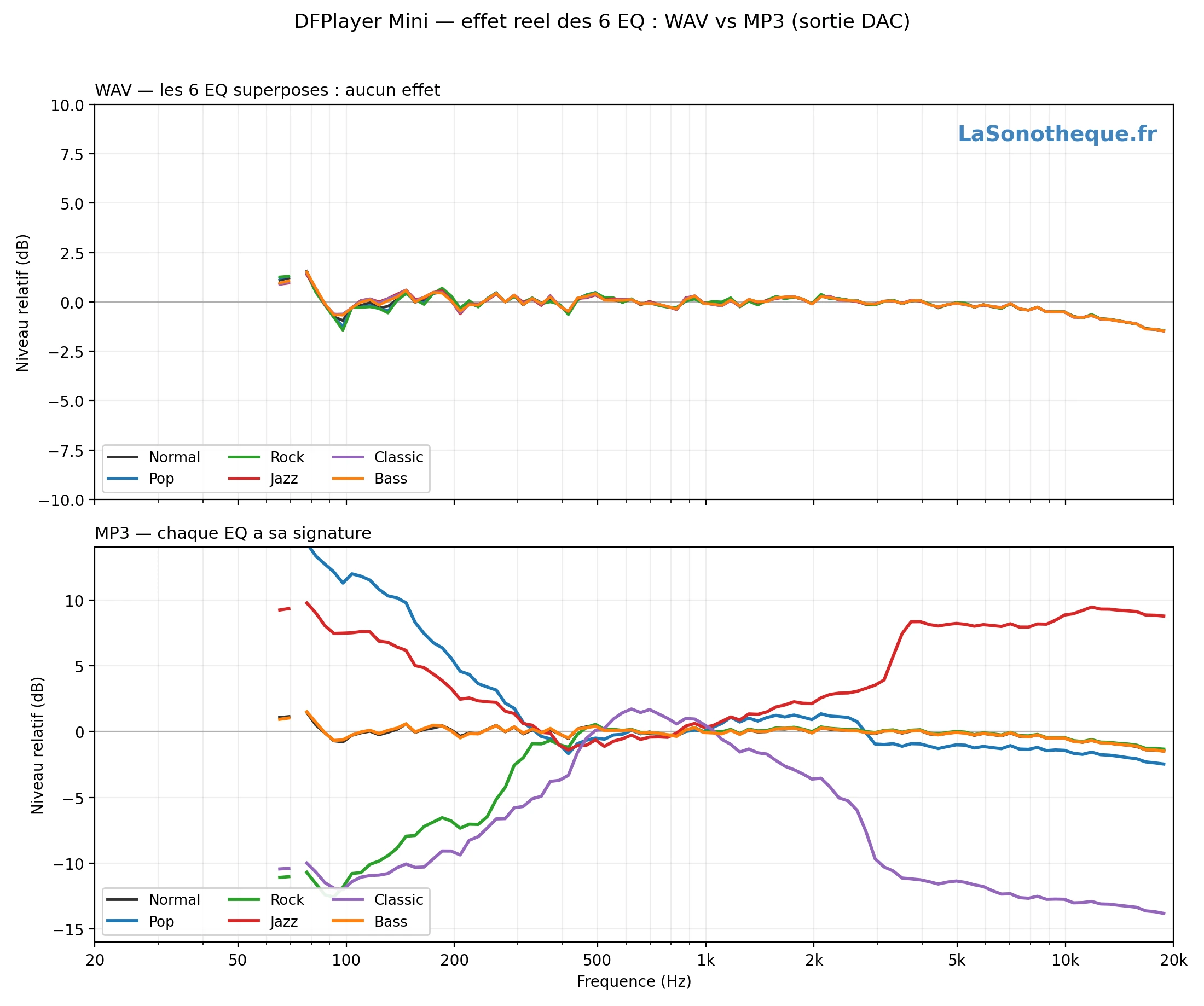
Here, in figures, is what each preset does on an MP3 (levels relative to the midrange, in dB):
| Preset | 40–120 Hz | 120–400 Hz | 1.5–5 kHz | 5–16 kHz |
|---|---|---|---|---|
| Normal | +0.3 | +0.1 | 0.0 | −0.5 |
| Pop | +12.9 | +4.6 | 0.0 | −1.5 |
| Rock | −11.4 | −5.6 | +0.1 | −0.5 |
| Jazz | +8.4 | +3.0 | +4.7 | +8.6 |
| Classic | −11.1 | −7.9 | −7.4 | −12.6 |
| Bass | +0.3 | +0.1 | 0.0 | −0.5 |
All the curves are aligned on the midrange (400–1500 Hz) to compare the shapes: a preset that lifts the bass appears positive on the left, one that cuts the treble negative on the right. The absolute level, on the other hand, is of no importance here.
The six curves, one per EQ
For each preset, two windows: at the top the WAV source (raw / DAC / 3W), at the bottom the MP3 source (raw / DAC / 3W). You can see at a glance that the WAV curves stay flat from one image to the next, while the MP3 curves change shape.


My approach, step by step
Everything is reproducible. Here's exactly how I went about it.
1. The setup
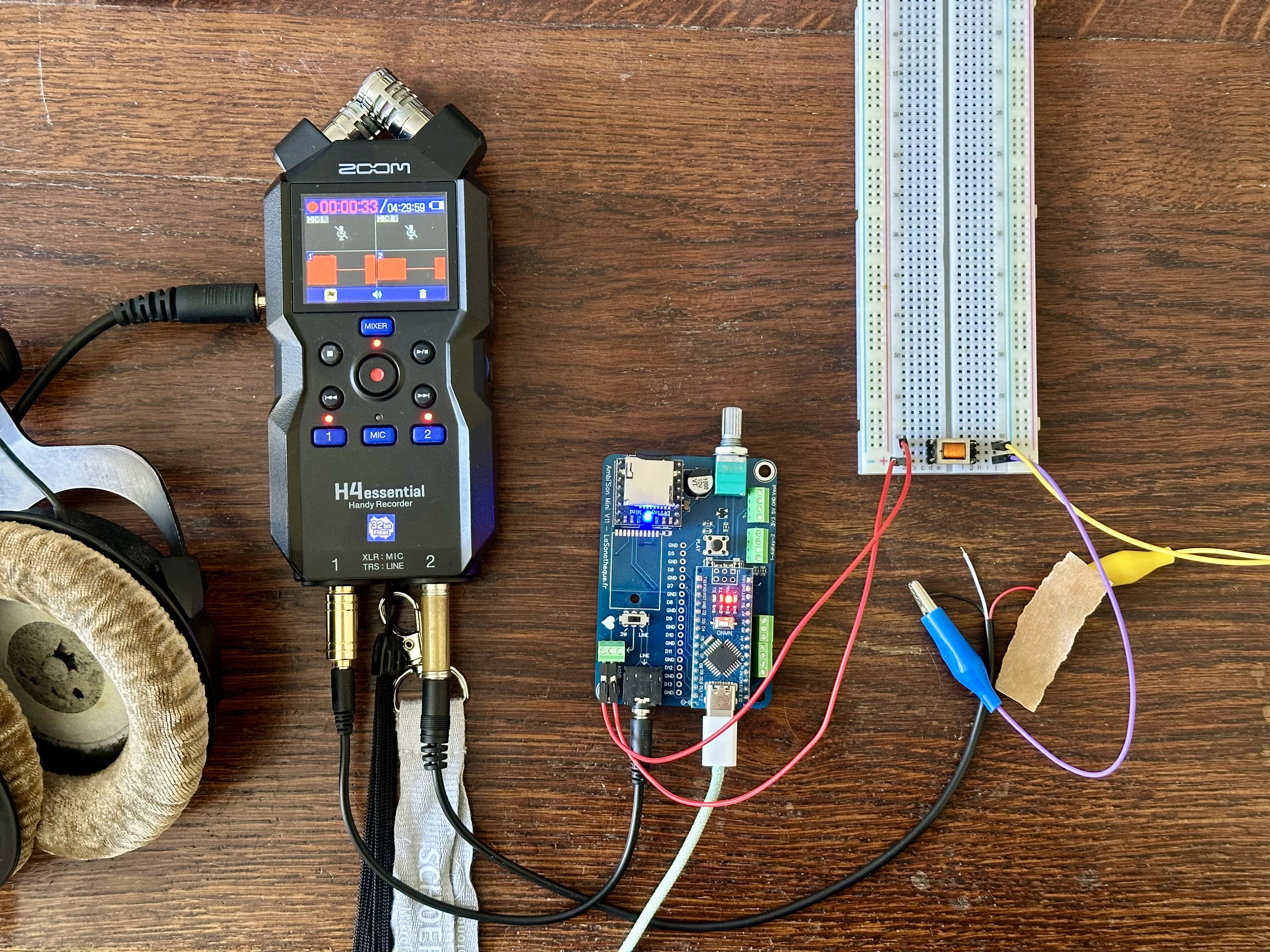
For this measurement, I reused one of my own modules: I mounted the DFPlayer Mini and the Nano on an Ambi'Son, which supplies them with power, the microSD card reader and the two audio outputs (DAC line and amplified 3W). From there, I wired the module's two outputs to the recorder: the DAC line output to track 1, and the amplified 3W output to track 2 — the latter through an isolation transformer (an SMD ED8 600:600 Ω, 1:1) that cleanly converts it into a balanced signal referenced to ground.
The 3W (SPK) output is a bridge (BTL): neither of its two terminals is ground. You must never connect an SPK terminal to the recorder's ground (short-circuiting one half of the amp). It's captured differentially, through an isolation transformer or an attenuator, loaded with a loudspeaker or a power resistor.
2. The test signal
I generated 30 seconds of white noise with the LaSonotheque noise generator. White noise has a flat spectrum: the curve you read at the output is therefore directly the filter's response, with no correction needed. I made two versions of it, placed on the SD card: 0001.wav (WAV) and 0002.mp3 (MP3, 320 kbps mono, so the codec colors it as little as possible). The WAV isolates the equalizer from the codec; the MP3 allows the comparison.
3. The Arduino program
A small program plays the white noise six times in a row, a different preset each time, separated by silences (which will serve as markers for the splitting). It first runs through the six EQs on the WAV, then the six on the MP3, in a single take. Two crucial precautions:
- the EQ is set BEFORE starting playback: setting it during playback creates an audible "jump" in the signal;
- once playback has started, no more serial communication: the slightest exchange on the UART makes the DAC click.
An EQ read-back command (readEQ()), sent while stopped, confirms on the serial monitor that the module is indeed holding the requested preset. The complete program can be downloaded here:
4. The recording
I captured at the line output (the electrical signal from the DAC), and not with a microphone in front of a loudspeaker: otherwise you measure the speaker and the room, not the filter. A Zoom H4essential on line input, fixed gain, captured both outputs simultaneously, which keeps the two channels perfectly aligned in time.
5. The analysis
The processing is automated (Python). The program detects the twelve blocks thanks to the silences (the longer silence separates the WAV group from the MP3 group), takes the stable core of each (discarding one second at each edge), then computes its spectrum. The calculation relies on Welch's method: the signal is cut into overlapping segments (overlap), each is windowed (Hann window) then passed through the fast Fourier transform (FFT), and the resulting power spectral densities (PSD) are averaged. This averaging flattens out the intrinsic variance of white noise, at the cost of a slightly coarser frequency resolution — the ideal trade-off here, where we're after the overall shape and not the fine detail. The spectra are then smoothed in twelfth-octave bands (fractional bands, logarithmic scale), then each curve is aligned on the midrange (400–1500 Hz) so as to compare only the shapes. It's this double averaging — Welch, then fractional bands — that makes a 0.5 dB difference perfectly legible, where the ear and a simple raw "Plot Spectrum" (a single, non-averaged FFT) see nothing.
What the community says
A few elements gathered elsewhere shed light on these results, even if none documents the WAV/MP3 matter.
- On many modules, the coupling capacitors on the DAC_L/DAC_R pins are undersized (0.1 µF), which strongly attenuates the bass and gives a "thin, bass-less" sound; replacing them with 10 µF capacitors brings the output closer to "hi-fi"1. In my case, the DAC output turned out to be perfectly flat.
- On my original DFR0299, decoding is handled by a DFROBOTILISP3 chip and the 3W amplifier by a classic class-D YX8002D chip — which explains why the 3W output is mono (sum of the left + right channels) while the line output is stereo, a difference I detail, chips in hand, in my comparison of DFPlayer Mini versions.
- Finally, beware of clones: many modules carry other chips (MH2024K, GD3200B…) with variable behavior; their equalizer curves may therefore differ from mine3. My measurements were made on a genuine DFPlayer.
Conclusion
The DFPlayer Mini's six equalizers are therefore quite real… but only on MP3, and under misleading names. If you play WAV, there's no point hoping to use them: they'll change nothing. If you play MP3 and are looking for bass, pick "Pop" and not "Bass"; for vocal presence, "Classic"; for a "loudness" sound, "Jazz". And if a doubt remains, measure: it's always safer than trusting a name.
A question, an idea, a remark about this article? Don't hesitate to comment, I'll answer personally!
Notes & sources
- Discussion thread "DFPlayer Mini audio quality issues (tinny/no bass), and how to fix", DFRobot forum — dfrobot.com/forum/topic/28525.
- "DFPlayer Mini Guide", Printed Droid (variability of clone chips) — printed-droid.com.