
The "Télé'Son S63" is an old telephone of the "So.co.tel S63" type (made by Matra, Thomson or ITT, from 1963 onwards), fitted with an audio player of my own design, ideal for creating a sound installation. Find it here, in the shop.
Want to fit out your own telephone? The kit has its own manual: Télé'Son S63 kit.
Quick overview
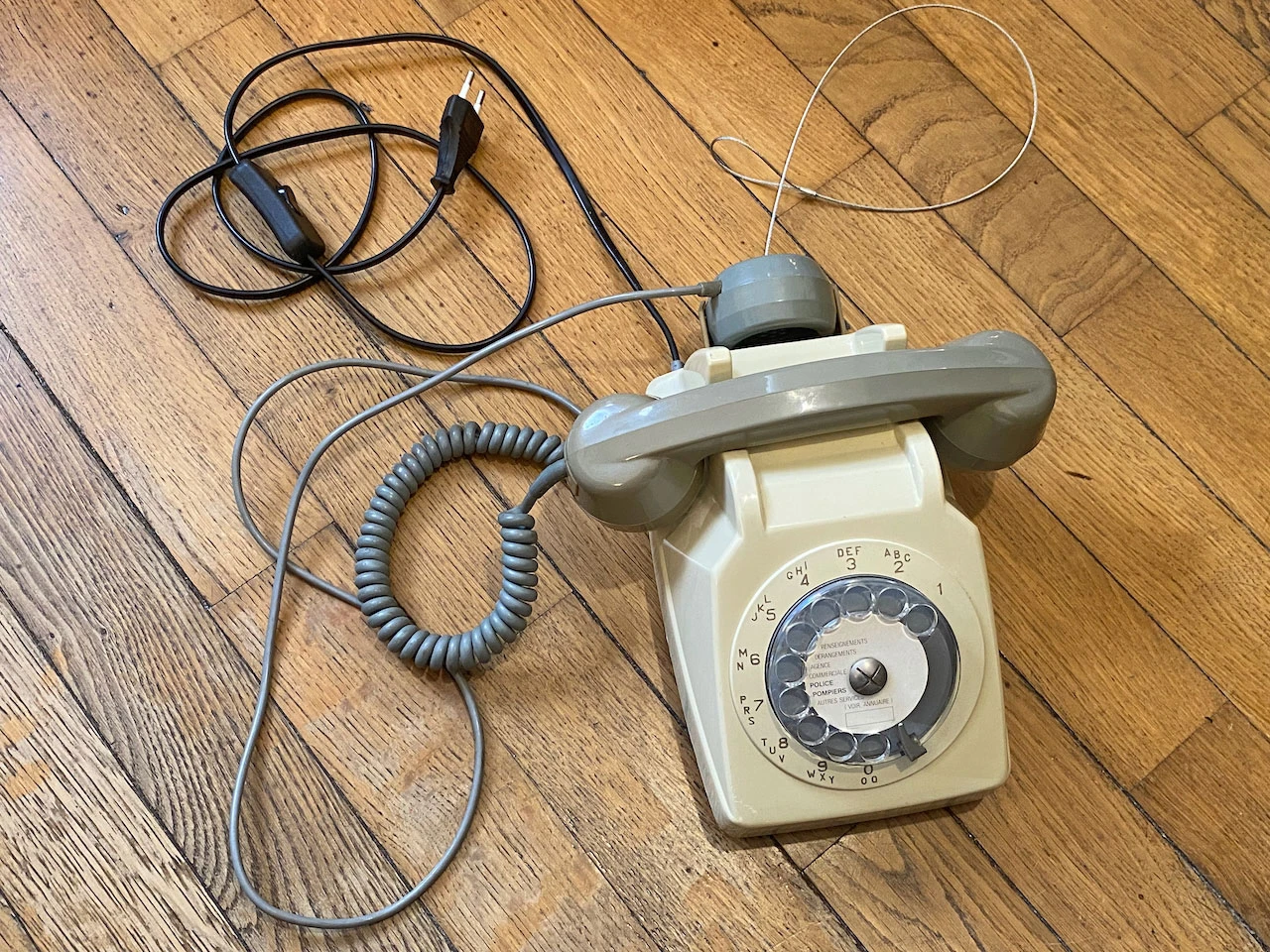
This telephone is fitted with an audio file player, with the files stored on a microSD card (included). It plays the MP3 (recommended) and WAV (up to 48 kHz / 16 bits) files on the card as soon as the handset is picked up, the dial is turned or the keys are used.
Models are regularly for sale in the BigSoundBank shop. If none is available, contact me: I have some in stock, and I can even fit out your own telephones to order.
Every model is unique: various colours, with or without a second earpiece, push-button or rotary dial, desk or wall-mounted, etc. My telephones are generally in good condition. However, they are of course very old devices that have come through the years, with signs of wear: faded colours, scratches, marks and other traces of use.
I fitted out these telephones myself. Research and development, circuit board design, right down to soldering the components: they are made by my own hands.
Fitted with an Arduino "Nano" type microcontroller, it can be reprogrammed by the more hands-on among you, to make it do whatever you like. Here are a few examples of what it can do:
- A "Quiz'O'Phone" with a single question or several questions, Christmas special.
- An escape game prop.
- An old, poetic hotel telephone.
- A "choose your own adventure" story, using the dialled numbers.
- Etc.
If you are hands-on and want to build your own installation from A to Z, follow this tutorial (cheap and easy), buy my "Ambi'Son" module or follow this other tutorial (harder but more complete). And if you want to build it yourself but get stuck, or would rather have some guidance, I can open my workshop to you to help.
Technical specifications
- Audio formats: MP3 (recommended), WAV — up to 48 kHz / 16 bits
- Storage: microSD card up to 32 GB (included)
- Power supply: mains, from 110 to 230 V, through the original cord and its switch; or from 7 to 16 V through a DC socket on the board (7 to 12 V on the V4 board), but then without the ringer
- Power consumption: less than 5 W (typically 3 W in normal use)
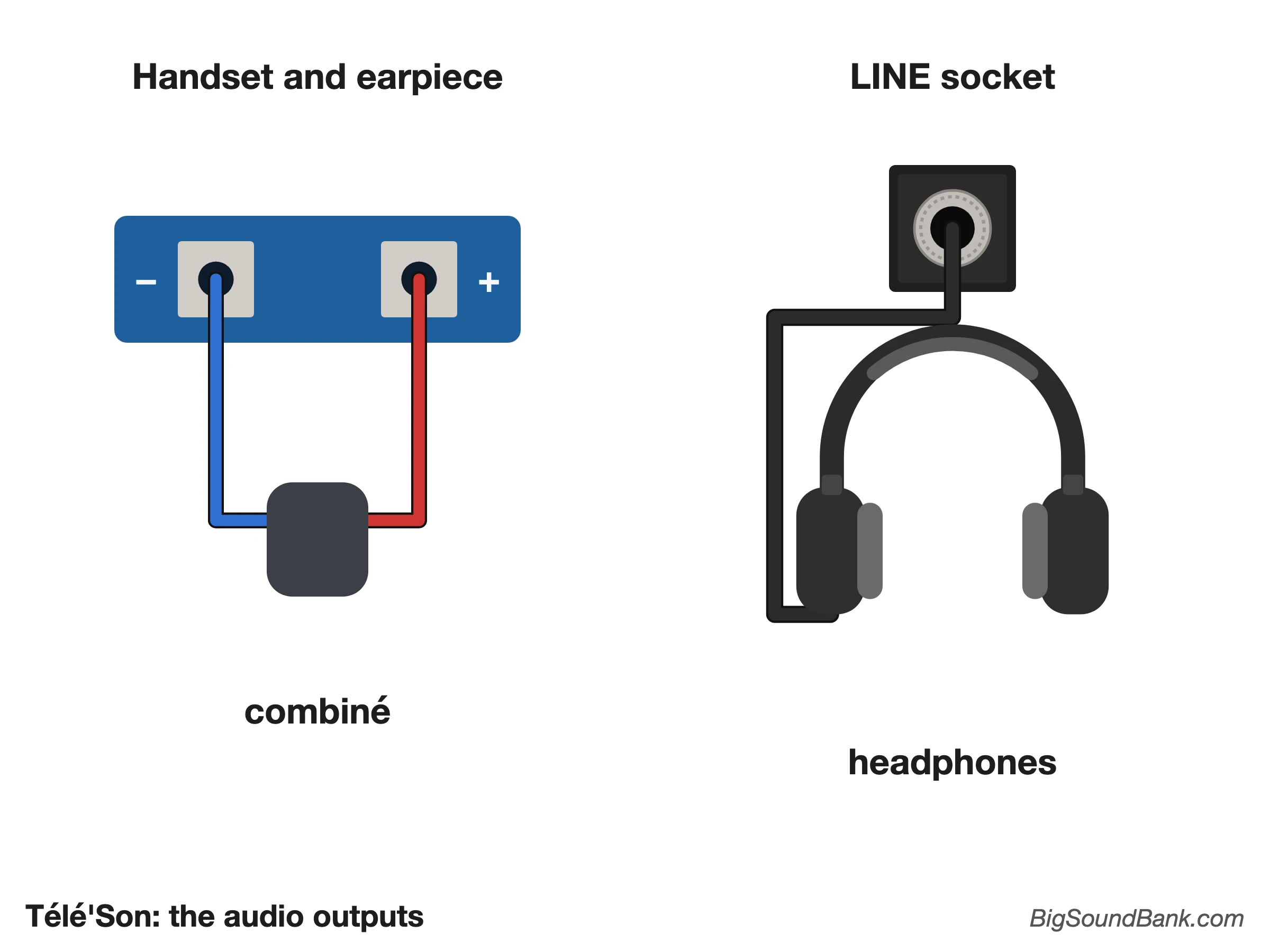
- Audio outputs: handset and earpiece (3 W amplified output, mono), "LINE" 3.5 mm jack socket (stereo, since the V4 board)
- Microcontroller: Arduino "Nano" (or clone), reprogrammable
Warning
Caution: on mains power, part of the board and the ringer carry 230 V. Always unplug the telephone before opening it, and never touch the board while it is plugged in. The Télé'Son is for indoor use, away from damp.
In detail
The numbers follow the path of the sound, from the power supply to the ringer; the same number refers to the same part in every image on this page.
Outside
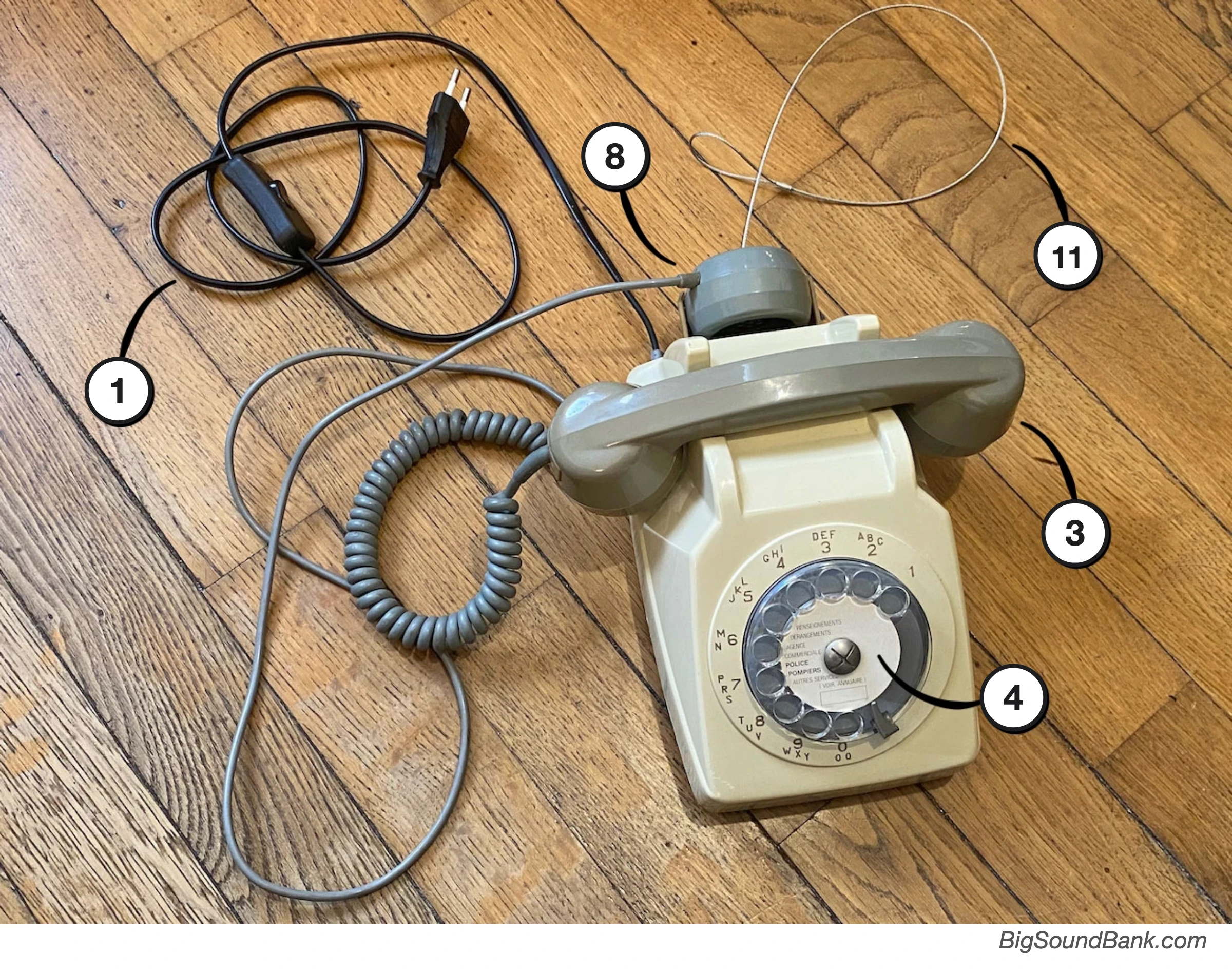
Legend
- 1: mains cord, with its switch.
- 3: handset.
- 4: rotary dial, or push-button keypad, depending on the model.
- 8: extra earpiece, depending on the model.
- 11: anti-theft sling (optional).
Explanations
Once the cord 1 is plugged into the mains and its switch set to ON, the handset 3 can be picked up. It plays a file from its microSD card. To move on to the next one, you can press any key or turn the dial 4.
Underside
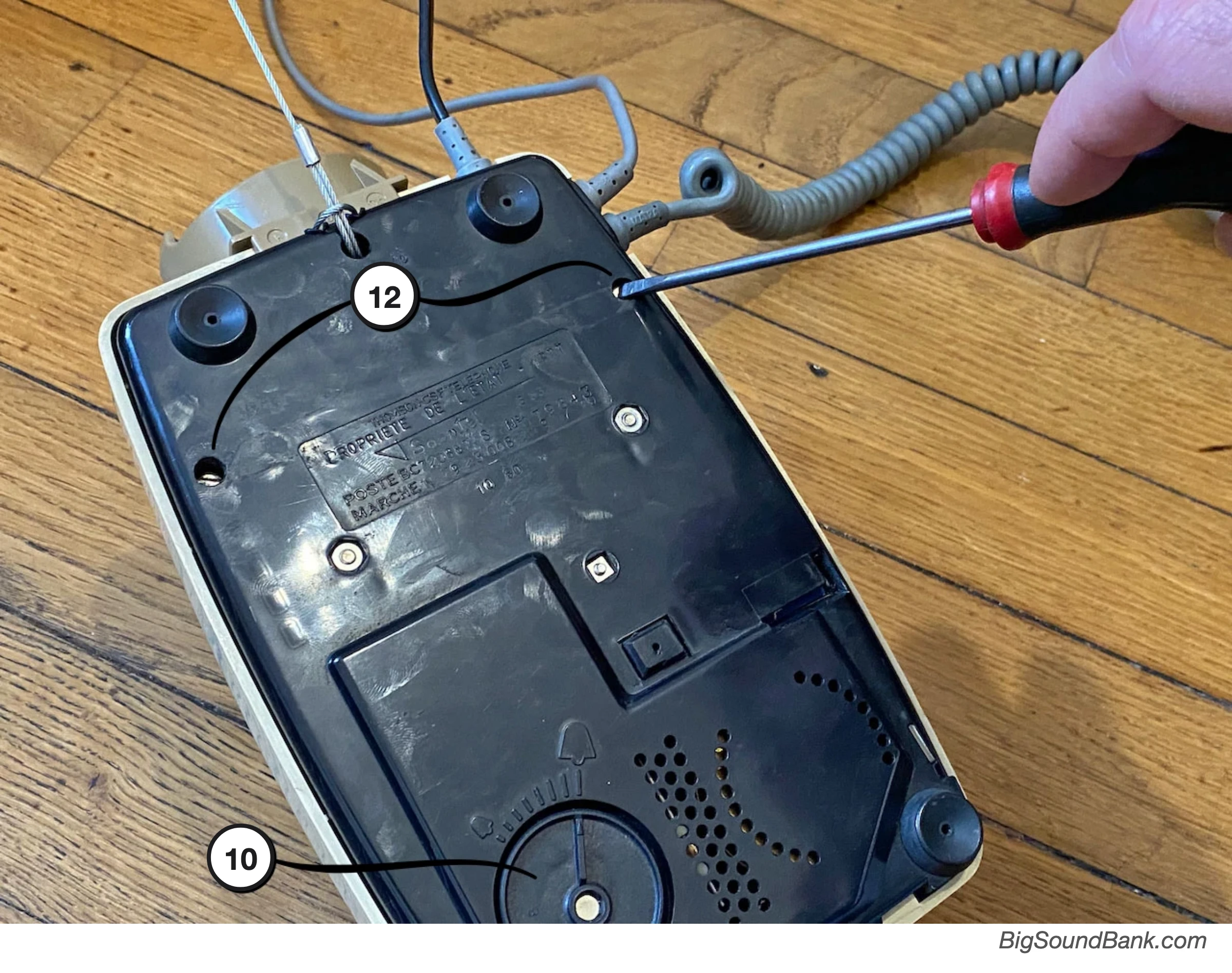
Legend
- 10: ringer volume control, depending on the model.
- 12: the two screws for opening the telephone. Unplug it from the mains first!
Explanations
After unplugging the telephone from the mains, you can undo the two screws 12 and so reach the inside of the telephone to customise it.
Depending on the model, the wheel or wheels 10 set the ringer volume, if the ringer is switched on.
Inside


Legend
The diagram shows the V5 board, the one in the latest Télé'Son S63. On an older board, as in the photo, the parts are not all in the same place, but they are the same.
- 1: power supply: mains input (on the mains module, which turns it into 9 V), and 7 to 16 V socket (5.5 × 2.1 mm DC plug).
- 2: microSD card reader.
- 3: hook switch, the telephone's original one.
- 4: "ROTATIF" connector, where the rotary dial is connected.
- 5: "CLAVIER" connector, where the push-button keypad is connected.
- 6: the six setting switches.
- 7: volume.
- 8: handset and earpiece lugs.
- 9: "LINE" jack socket, for headphones or an amplifier.
- 10: ringer: its relay, and the screw terminal where the wires of the original ringer are connected.
Power supply
The Télé'Son plugs into the mains 1: remember to set the cord switch to ON. The board's mains module accepts 110 to 230 V.
Without mains power, the board can also be powered through its 7 to 16 V socket (7 to 12 V on the V4 board), with a standard DC plug (5.5 × 2.1 mm, known as "DC5521"), + in the centre: from a DC power supply, or with a battery box (rechargeable batteries recommended, or ordinary batteries). Plugging in the DC plug cuts the board off from the mains. The telephone does not ring then: a telephone ringer needs the alternating current of the mains.
Files
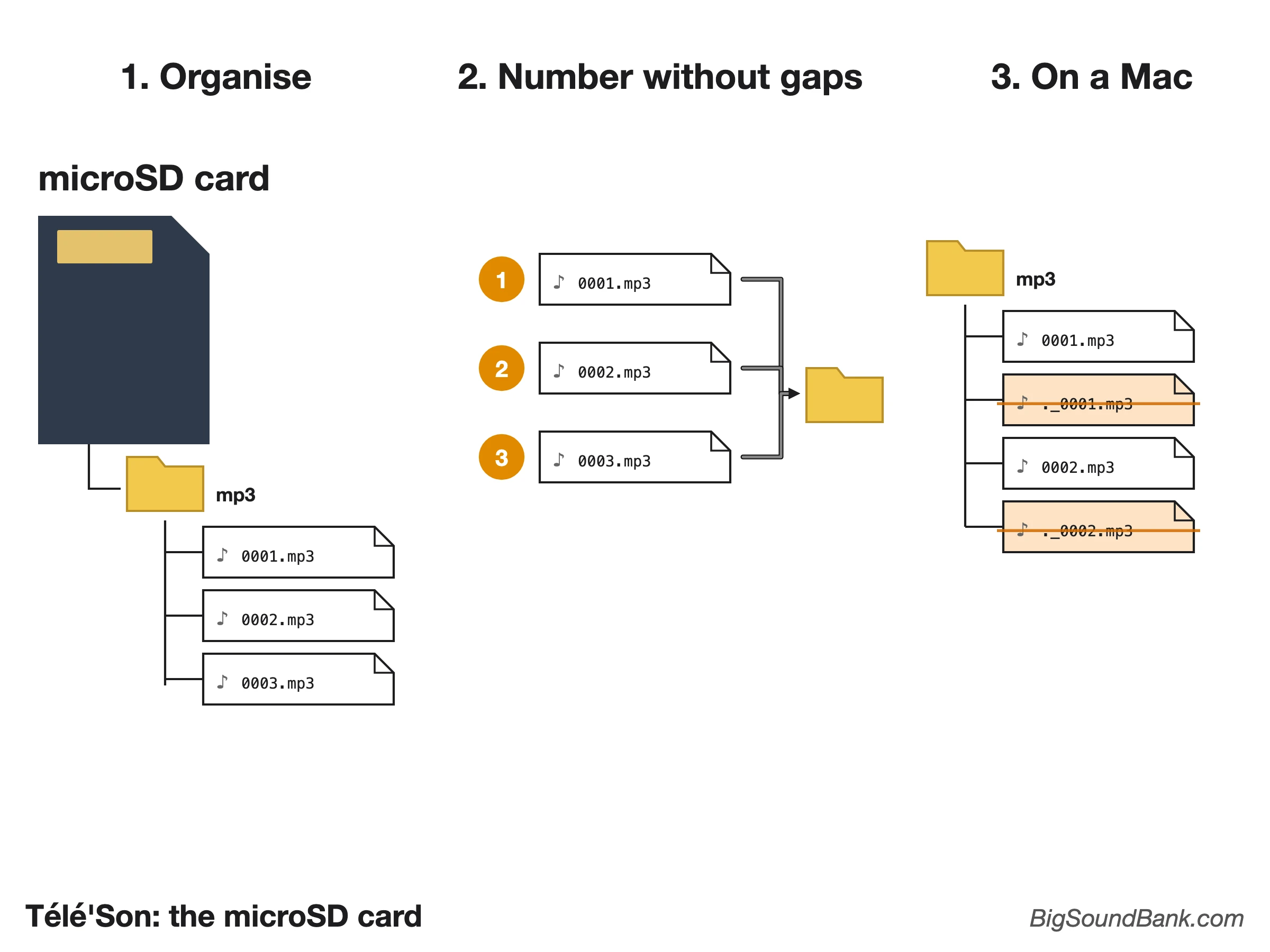
The reader 2 accepts a microSD card of up to 32 GB, formatted in FAT16 or FAT32. Put your sounds in a folder named mp3, at the root of the card, and name them 0001, 0002, 0003… without skipping a number: dialling "23" plays file 0023. The order in which you copy them does not matter, it is the name that counts. The file with the highest number is used as the intro (switch 3). Do not put anything else on the card.
On a Mac, hidden "._" files are added, which the player counts as sounds: type dot_clean /Volumes/CARD_NAME in the Terminal to delete them.
Handset, dial and keypad
The telephone knows when the handset is picked up thanks to the original hook switch 3, which I soldered onto the board.
A Socotel S63 can have a rotary dial or a push-button keypad. The dial is connected to the "ROTATIF" connector 4, the keypad to the "CLAVIER" connector 5, and switch 6 tells the program which of the two is connected. I have set it for your telephone: do not touch it.
The six switches
On the board, a red block 6 holds six small white switches. It is read from the nearest edge of the telephone: stand on that side, and switch 1 is then on the left and switch 6 on the right. Pushed up (towards the centre of the board and the markings A1 to A6), a switch is "ON"; pushed down, it is "OFF". Here is what they do:
- 1 No ringing (OFF), or the telephone rings from time to time while hung up, to attract the attention of visitors (ON, on mains power only).
- 2 Files played at random (OFF) or in order (ON).
- 3 No intro file (OFF), or back to the intro file, the last one on the card, when the handset is picked up and when a number that does not exist is dialled (ON).
- 4 Only one file is played each time the handset is picked up (OFF), or they follow one another automatically until the handset is hung up (ON).
- 5 Numbering disabled: each number dialled plays the next file (OFF); or enabled: if you dial 23, file 0023 is played (ON).
- 6 Rotary dial (OFF) or push-button keypad (ON): already set for your telephone.
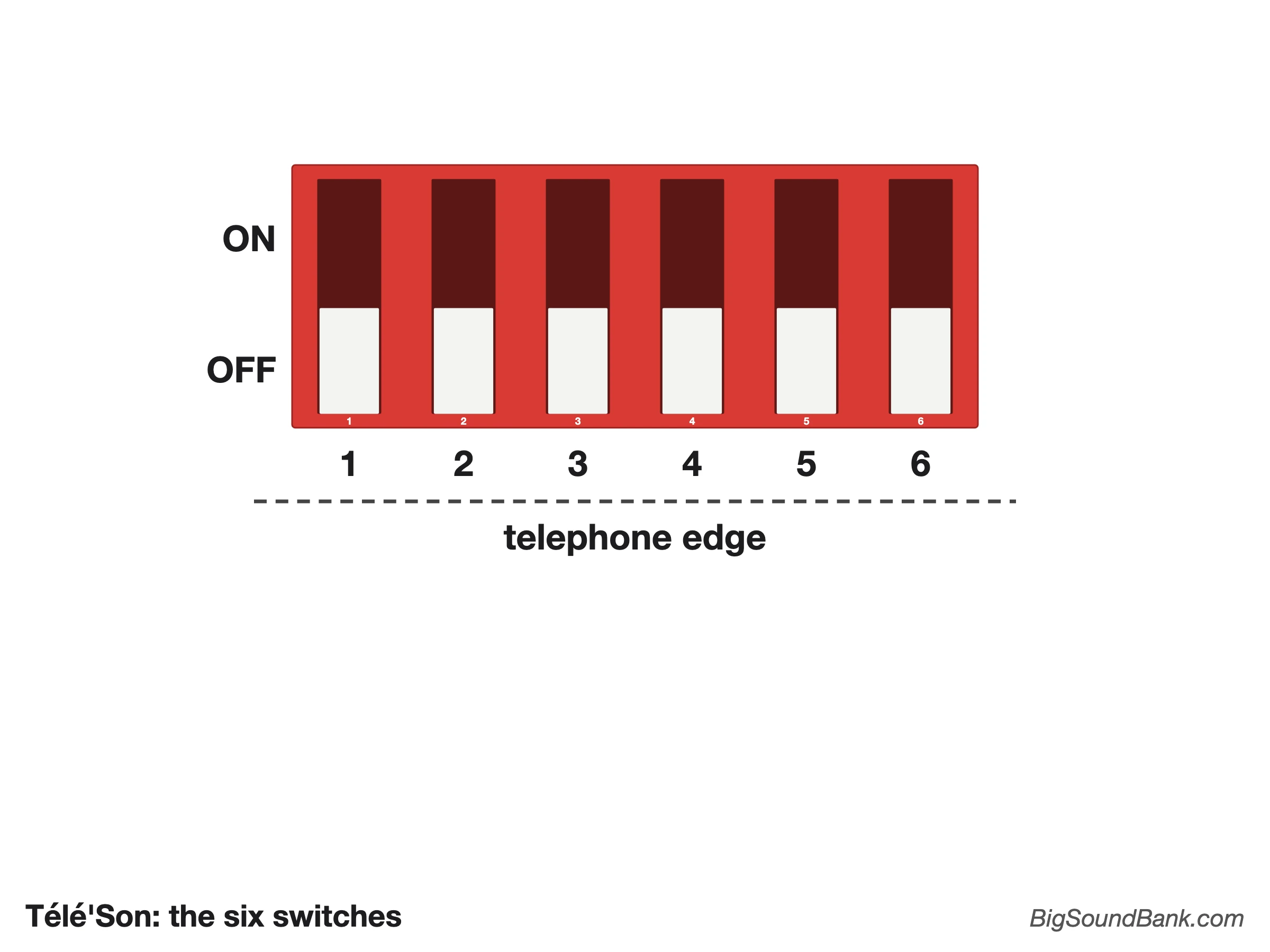
Change the settings with the telephone unplugged, then plug it back in.
Volume
The volume is set by hand, by turning the shaft of the small potentiometer 7. It acts on all the outputs.
Listening
You listen through the handset (mono), whose wires are screwed onto the lugs 8. If your telephone has one, the extra earpiece is connected to the same place, and plays the same sound.
You can also plug one or more headphones (with a splitter), an active speaker or an amplifier into the "LINE" jack socket 9, in stereo. Both outputs work at the same time.
Ringer
The relay 10 rings the telephone's original ringer, connected to its screw terminal. When switch 1 is ON and the telephone is hung up, it rings for the first time after one minute, then less and less often (at most every 5 minutes), until someone picks up. The wheel 10 under the telephone, depending on the model, sets its volume.
First use
First test
- Plug the telephone into the mains 1 and set the cord switch to ON.
- Wait 5 seconds.
- Pick up the handset 3 and listen.
- Magic!
Adding your own sounds
- Unplug the telephone from the mains!
- Open the telephone with the two screws underneath 12.
- Take out the microSD card from the reader 2.
- Format it in FAT16 or FAT32 (32 GB maximum).
- Put one or more sounds into a folder named "mp3", preferably in MP3 format (or WAV, up to 48 kHz / 16 bits). Name the first one "0001", then "0002" and so on, without skipping a number.
- Put the card back into the reader 2.
- Close the telephone with the two screws.
- Plug in the telephone, cord switch on ON, and wait 5 seconds.
- Pick up the handset and listen.
- Magic!
Settings (optional)
- Unplug the telephone from the mains!
- Open the telephone with the two screws underneath 12.
- Set the volume 7 as you like.
- Choose your settings with the six switches 6 (see "The six switches", above).
- Close the telephone with the two screws.
- Plug in the telephone, cord switch on ON, and wait 5 seconds.
- Pick up the handset and listen.
- Magic!
If nothing happens
- Check the cord switch 1: it must be ON.
- Unplug the telephone and open it.
- Check the microSD card: pushed fully into its reader, formatted in FAT16 or FAT32, an "mp3" folder at the root, files named "0001", "0002"… without gaps, and nothing else.
- Check the volume 7.
- Close it, plug it back in, wait 5 seconds, and pick up the handset.
Have fun!
Ideas & Recommendations
- If you use numbering (switch 5 ON), dialling "18" plays the file named 0018. But the files must be numbered without gaps: if, for example, the only useful numbers are 18 and 20, you still need files 0001 to 0017, and a 0019. Silent files lasting 0 seconds will do the job, and you can generate one right here. If you use the intro (switch 3 ON), it comes after them: here, it would be file 0021.
- Out of curiosity, I measured the response of the S63 earpieces: by playing white noise (flat spectrum) and capturing what actually comes out, you can see that it behaves as a band-pass filter, between about 300 Hz and 4 kHz. So there is no point putting deep bass or bright treble into it: it does not reproduce them. To make up for this, the ideal is to apply the inverse curve when mixing: boost what the earpiece attenuates, but only within its useful band. In practice: keep the essentials (voices, key sounds) in the 300 Hz–3.5 kHz band, cut below about 150 Hz, and lift the presence a little around 1–3 kHz for intelligibility. Your sounds will come out clearer and louder.
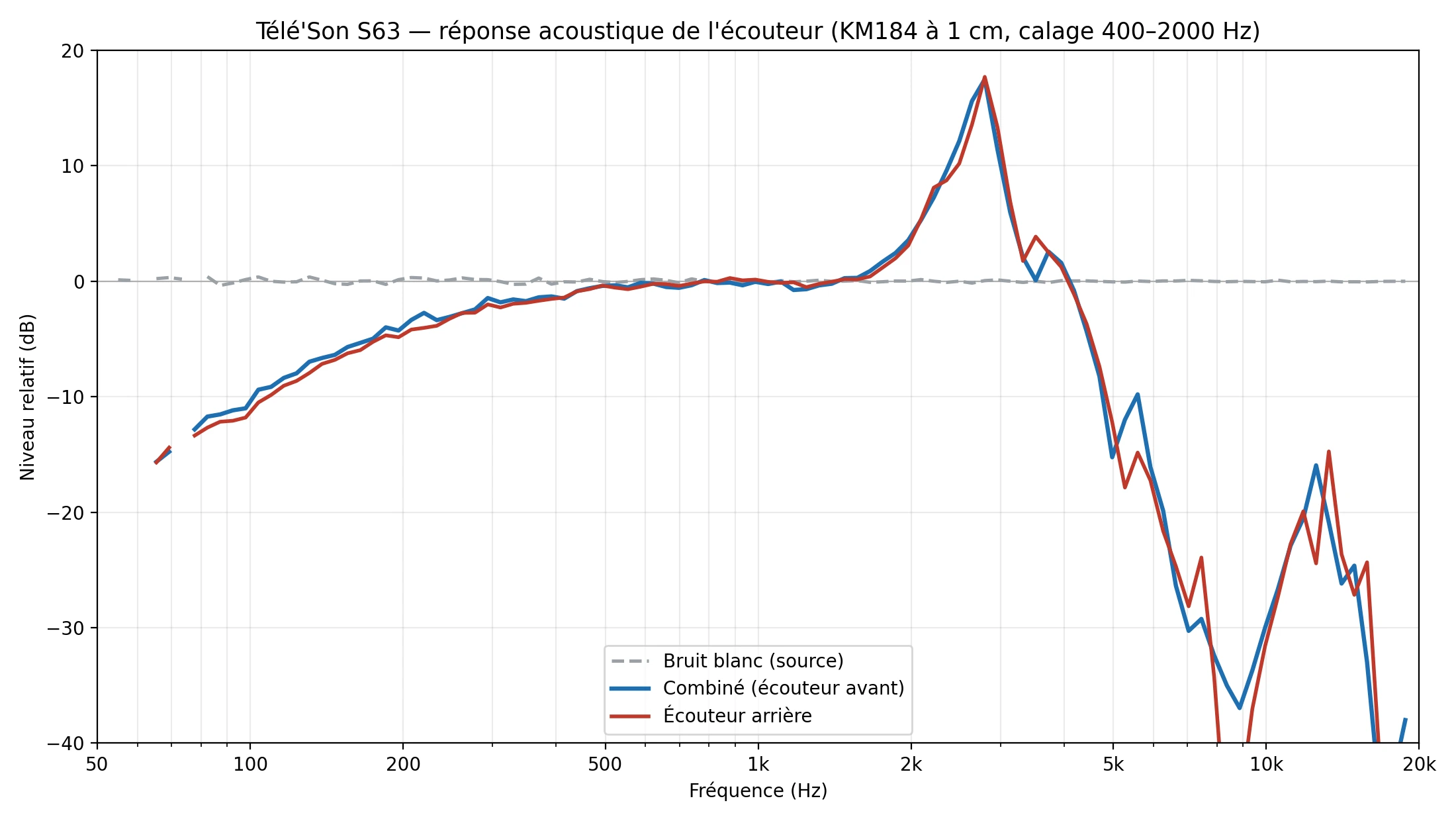
Measured frequency response of the Télé'Son S63 earpieces (chart in French) - When the handset is picked up, the sound starts immediately. Slow people may therefore miss the beginning of your file. So I recommend adding 1 to 2 seconds of jingle before your file. Silence is not enough, because people who pick up quickly might think the device is not working. The jingle lets them know that the file is about to start.
- Sometimes the telephone has an earpiece at the back 8. It may seem a good idea, so that two people can listen at the same time. However, you will quickly notice that some people use the back earpiece without picking up the handset. Since it is the handset that starts playback, these people will hear nothing. So I recommend simply removing this earpiece.
- The ringer can attract visitors' attention, which seems a good idea. However, from experience, it quickly and seriously annoys the people around, especially the exhibitors.
- Because it is sometimes better to guard against theft, an anti-theft sling 11 (sold separately) can be fitted on a desk S63: it goes through the round plastic post in the base. Add a simple combination or key padlock (not included). You can also extend it (sold in packs of 10).
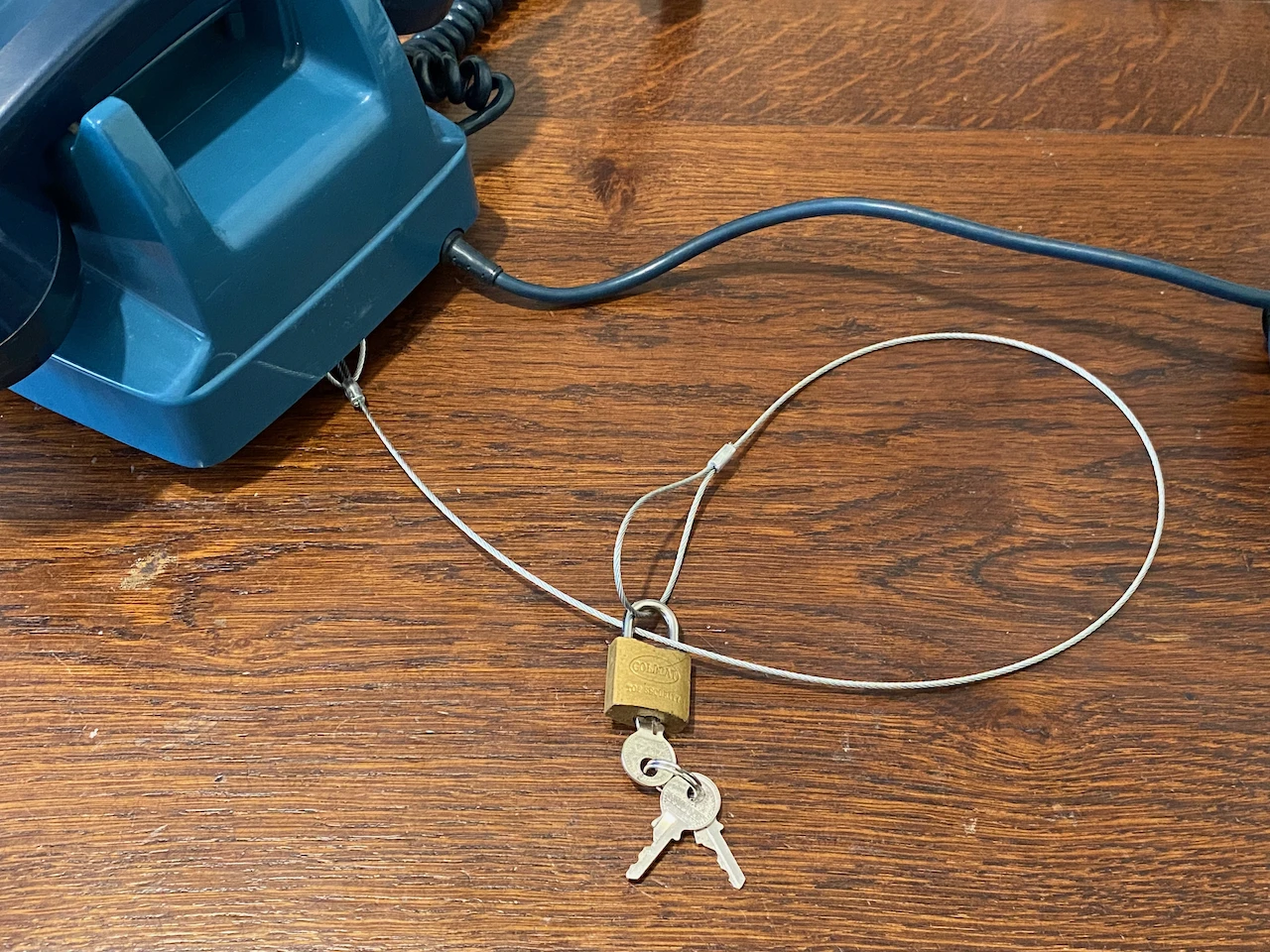
Illustration of a sling and a key padlock
Advanced use
Random explained
Although true randomness does not exist in computing, I am rather proud of mine and would like to explain it:
To prevent the (bad) luck of randomness from playing the same sound twice in a row (which is statistically possible, and frustrating), my program counts the number of files on the card, then plays them all at random, without repeating a single one until they have all been heard. Once the list is used up, it makes a new one, and so on.
Nano
The Télé'Son is controlled by a Nano. So it is perfectly possible, and easy, to create your own program. So have fun! Here are its pins, as my program uses them:
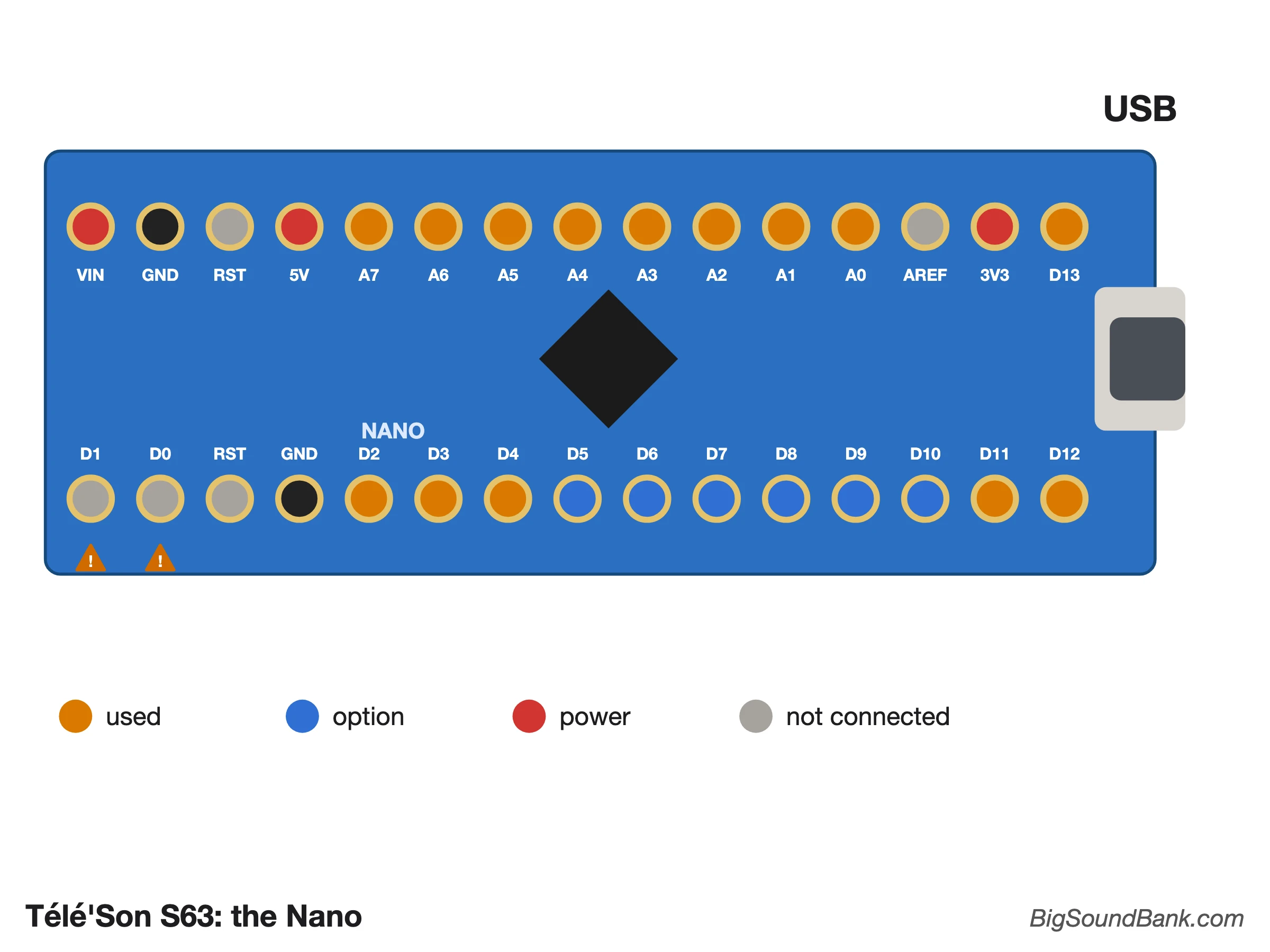
You can also get help from the DFPlayer Wiki.
Have an idea and want to know whether it can be done, and how? Feel free to contact me!
Problems & Solutions
While the DFPlayer is a brilliant little player that powers many of my creations, including this one, it has many small flaws that are nevertheless easy to work around. So here is an article dedicated to solving all the problems of the DFPlayer Mini.
Versions
Every time I launch a new production run of circuit boards, I make a few changes to the design. Feel free to send me your suggestions for the next versions.
- October 2023 - V1: For rotary dial telephones only. Bug with the ringer. Can only fit certain versions.
- February 2024 - V2: Added push-button keypad telephones (matrix). Ringer bug fixed. Can fit all "desk" Socotel S63.
- January 2025 - V3: Can fit "wall-mounted" Socotel S63.
- November 2025 - V4: 7 to 12 V power supply possible, two jack sockets added ("Line" and "3W").
- November 2026 - V5: 7 to 16 V power supply, large capacitor acting as an energy reserve for loud sounds. The "3W" socket is no longer fitted.
Conclusion
Using this Télé'Son is really simple but, at the risk of repeating myself: feel free to contact me if you have the slightest question or suggestion about it!